Welcome to Deals: Your Games Site, Your Way
Welcome to GameSync Deals, a bright, retail-style WordPress theme for sites that point readers to the best game prices. It is built on the same foundation as PixelWire, so everything a games site needs is already here, but the look and the features are all about the sale: red price tags, new and old prices, countdowns and a Deals page that does the browsing for your visitors. This demo is a quick tour. Click around, then make it yours without writing any code.
A deal is just a few fields
Open any game or post and fill in the Deal box in the right-hand column: the sale price, the regular price, the store, your deal or affiliate link, an optional coupon code and the last day of the offer. The percentage off is worked out for you. Clear the sale price and the deal is gone. Because the values live in their own fields, syncing a game from IGDB again never touches them.
Prices that catch the eye
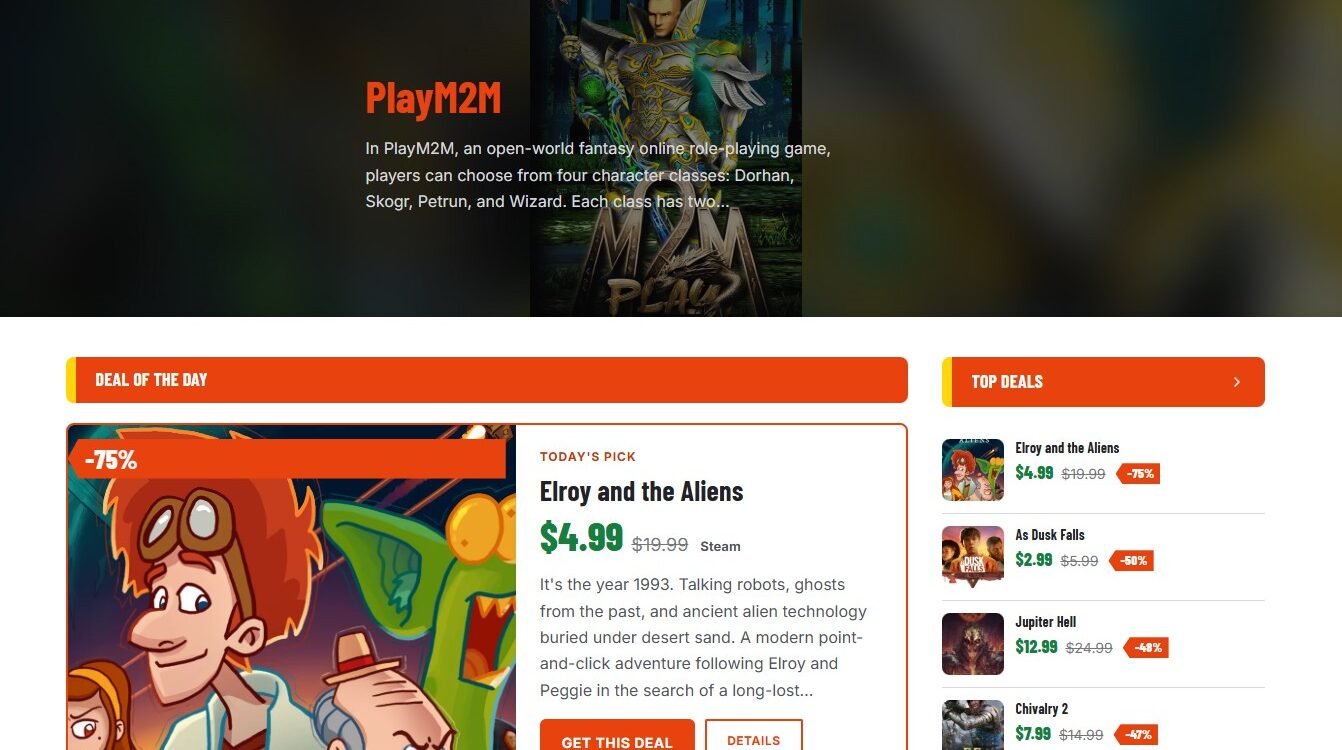
Every game with a live deal gets a red “-60%” tag on its image (a yellow “FREE” tag for free games) and the new price next to the struck-through regular price. It shows on every card, list, hero slide and sidebar box, so a deal is noticed wherever the game appears. On the game page, a Deal box puts the price, the end date, a click-to-copy coupon code and a big “Get this deal” button right under the title.
Urgency, without the guesswork
When a deal ends within a week, its card shows an “Ends in 2 days” pill. In the last two days it turns red, and in the last 24 hours it counts down live, “Ends in 5h 12m”, even on cached pages. When the last day passes, the tag, the price and the button disappear on their own, in your site’s own time zone, so you never leave an expired offer up.
A homepage that sells
The homepage opens with a hero slider and a Deal of the Day card: automatically the biggest discount, or a rotation through the games you pick, one per day. Below it, Hot Deals and Ending Soon rows fill themselves from your live deals. Drag them into any order alongside Featured Games, Latest News, Videos and your genre rows, or hide the ones you do not need. An optional slim bar under the header keeps today’s deal in view on every other page, and a Top Deals box in the sidebar does the same.
A Deals page visitors can sort and filter
All live deals sit on one page. Visitors sort by biggest discount, ending soon, price or newest, and narrow it down by minimum discount (25%, 50%, 75% and up) and by store. Want a deals grid somewhere else? The shortcode puts one on any page or post. The menu already has a Deals link, and the page can sit at a clean address of your choice.





Bring readers back when the price drops
Members can favorite any game. If they also tick one box under My Account, they get an email when a game on their favorites list goes on sale. It is opt-in, goes out once per deal, and links straight to the game page. It is the easiest reason for a visitor to create an account and come back.
Built for game data
Pair the theme with the GameSync Game Data Importer and every game gets its own page with cover art, screenshots, trailers, genres, platforms and release details, ready for a deal to be attached. The companion plugins for ratings, related games and review breakdowns work here too. Prices are entered by you in the Deal box, so you stay in charge of every deal and every link.
Features for your community
Favorites, Want to Play, Playing and Completed lists, recently viewed games, public member profiles, front-end login and registration, a newsletter box with confirmation and broadcast tools, and a contact page are all part of the theme.
Make it earn
Deal links open in a new tab and are marked as sponsored, ready for affiliate programs, and you can add affiliate store buttons on game pages. Five ad slots (three in the sidebar and two on the homepage) take either ad code or a banner image, with visibility controls for each. Search engines also get price information (schema.org Offer) for every game with a deal.
Your look, your currency
Choose the sale accent colour, currency symbol and position ($19.99 or 19.99 kr), currency code, the name of the Deals page, and which badges and boxes to show. Social links, the footer and the sidebar are set from the same settings screen.
Get started
Install the theme and open GameSync Deals in your WordPress admin. Set your currency under Deals, arrange the homepage under Homepage Sections, then open a game, fill in the Deal box and see it appear across the site. When you are ready, delete this demo post and publish your first deal.
